Context
Team: I was the only designer, working with the CEO, CTO, a product manager and front-end and back-end developers, alongside an external SEO agency.
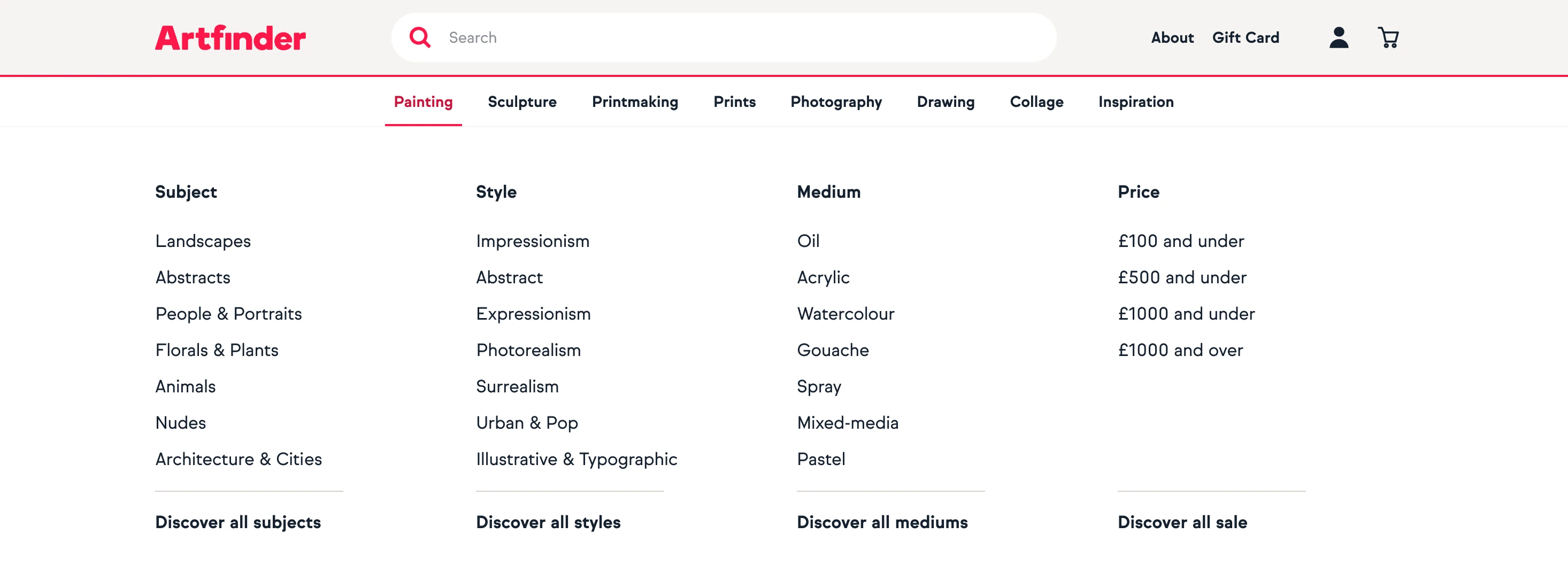
My part: I researched how people used the navigation, rebuilt the catalogue’s taxonomy, worked with the SEO agency on category names and designed the final mega menu.
Timeline: I completed the research and findings in four days, during my 2024 contract at Artfinder.
The problem
No data on the menu itself: the main navigation wasn’t tracked in Google Analytics, so there were no numbers on how people used it.
What the recordings showed: I watched 150 of the 1,105 Hotjar recordings that involved the main navigation over three months, looking for patterns that repeated. The percentages below are directional estimates from those 150, not measurements across all visitors.
Subjects without a category: about 16% of people who clicked a subject such as ‘Landscape’ expected paintings. They saw photography and drawings mixed in, scrolled back up and added a painting filter, losing around a minute.
Categories without detail: about 24% of people who clicked a category then added a subject or style filter, anywhere from 20 seconds to 2 minutes later.
Confusing terms: the menu used ‘Medium’ for categories like painting and photography, but in art, medium means the material, such as oil or watercolour. Some people skipped the menu and went through ‘Discover all art’ instead.
Hidden style: style wasn’t in the menu at all, and on listing pages it was buried under ‘More filters’.
Decision 1: Rank subjects and styles by purchases, not visits
What I saw: Google Analytics showed that what people look at and what they buy are different. In paintings, ‘Nudes’ was the third most visited subject but only sixth in purchases, while ‘People and portraits’ was fifth in visits and third in purchases.
What I did: I ordered the categories by what people visit most, and the subjects and styles under each category by what sells. I kept the top level to seven items to avoid overloading people.
| Ordered by | |
|---|---|
| Categories, at the top level | Visits |
| Subjects and styles, inside each category | Purchases |
Decision 2: Category first, then subject, style and medium
What I saw: people already knew the kind of art, subject and style they wanted, but the old menu made them get there through filters. Competitors such as Saatchi Art, Rise Art and Singulart exposed far more of their catalogue in the menu. Internally, stakeholders wanted the menu to show the depth of the catalogue, and better taxonomy to replace manually curated collections with automated ones.
What I did: I worked through five versions of the structure, from ‘Category > Medium, Subject, Style’ to ‘Category > Subject, Style, Medium’. In the final mega menu, each category has its own columns for subject, style, medium and price, plus curated collections and editors’ picks.
| Before | After | |
|---|---|---|
| Top level | Categories, under the label ‘Medium’ | Seven categories, with printmaking apart from prints |
| Subjects | On their own, mixing every kind of art | Under each category |
| Style | Not in the menu | Under each category |
| Medium | Meant the category, such as painting | The material, such as oil or watercolour |
| Also in the menu | Sale and price links, taking up much of it | A price column, curated collections and editors’ picks |
Decision 3: Getting the language right
Art terms: I corrected terms to match art-world usage: ‘Impressionistic’ became ‘Impressionism’, ‘Surrealistic’ became ‘Surrealism’, ‘Photorealistic’ became ‘Photorealism’ and ‘Expressive and gestural’ became ‘Expressionism’. For an art marketplace, wrong terms cost credibility.
Prints vs printmaking: the old menu grouped hand-made printmaking with digital prints. They differ in materials, price and audience, so I split them into separate categories.
Search: the SEO agency found that the old menu’s subcategory links were built in JavaScript, so search engines couldn’t crawl them, and that much of the menu was spent on sale and price links. Their keyword research shaped the category names.
Results
What shipped: a seven-item top level, mega menus with subject, style, medium and price for each category, corrected art terms, and printmaking separated from prints.
Still live: the team shipped the new navigation after my contract ended, and it’s still live on artfinder.com with the same information architecture.
Measuring it: the menu wasn’t tracked in Google Analytics before the redesign, so I can’t claim a change in behaviour after launch.
What I’d do differently
Instrument the menu first: I’d get navigation clicks tracked in Google Analytics before the redesign, so the impact could be measured.
Run the usability test: I wrote a 60-minute moderated usability test script with a realistic shopping task, but it wasn’t run. I’d push for it, and use it to check the new category names with customers too.