Context
Team: I was the only designer, working with Artfinder’s engineers.
My part: the audit, the foundations, the tokens, every component and the documentation.
Timeline: 2 weeks in 2024. The team then rolled the system out gradually.
The brief: the company had decided to move to Figma, but there was nothing in Figma yet, and no proper design system in Sketch or InVision either.
The problem
An audit of the live site: before defining any foundations, I collected examples of the same thing built in different ways, such as several form styles, two headers and different product cards.
A 5px spacing base: spacing didn’t follow a consistent scale.
No tokens: colours and sizes were set as raw values, with no shared names.
Accessibility: some brand colour pairings, including on buttons, failed WCAG AA contrast.
Decision 1: Two layers of tokens
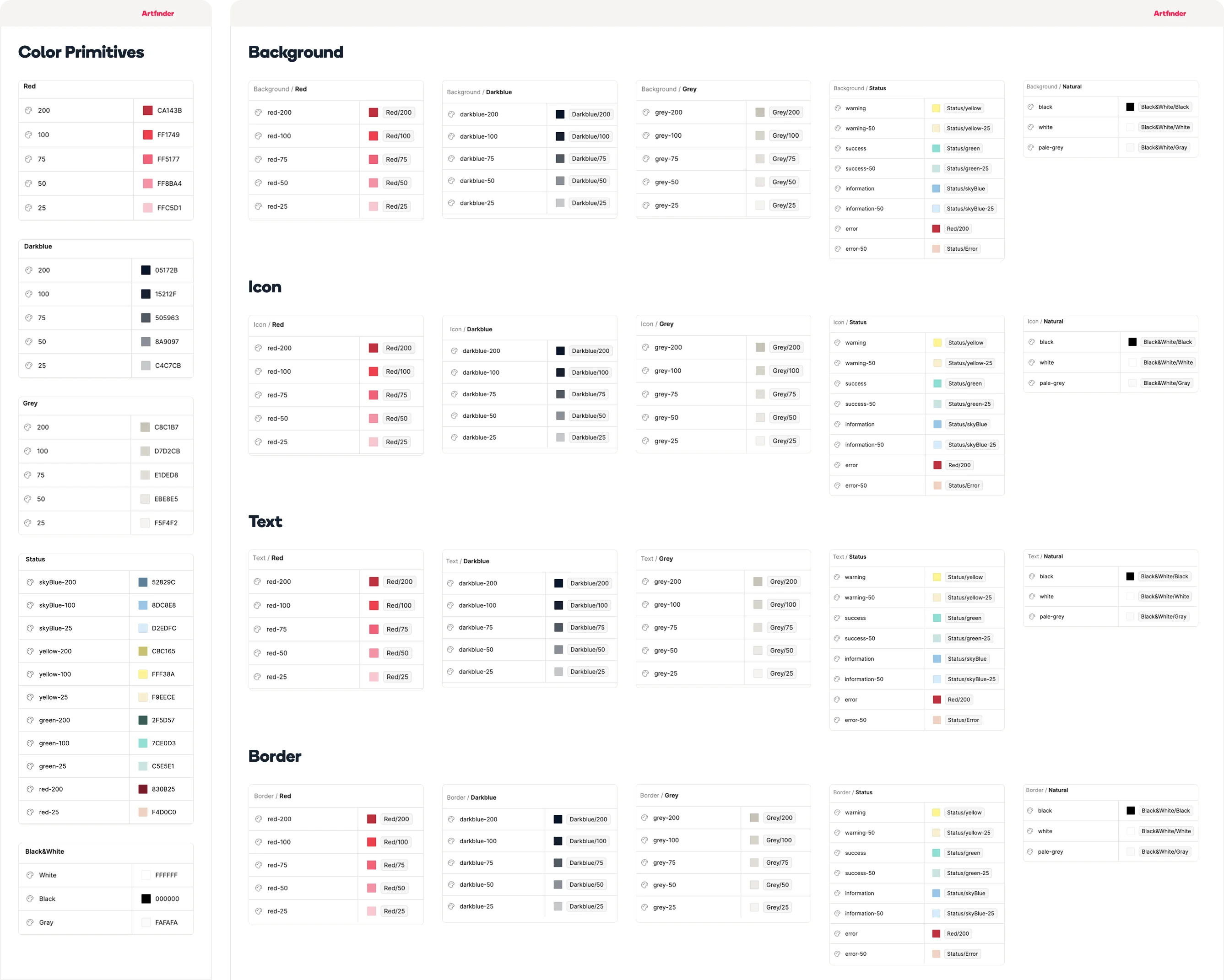
Primitives: raw values, such as Red/200, Darkblue/100 or Grey/50, plus size primitives in 2px steps (size(4) is 8px) that spacing, radius and elevation all reference.
Semantic tokens: names that say where a value is used. There are four groups (Background, Text, Icon and Border), each with red, dark blue, grey, status and neutral sets, such as Text/Darkblue-200 or Background/Grey-200.
Why: engineers use semantic names instead of hex codes, and changing a primitive updates everything that uses it.
Decision 2: A 4px base instead of 5px
What I did: I moved the spacing base from 5px to 4px, in line with widely used systems such as Material Design and Atlassian, and set up a 12-column grid with 24px gutters across five breakpoints.
The outcome: it was my call, and the team adopted it.
Decision 3: Contrast built into the system
What I did: I documented the contrast ratio of the key brand colour pairings against WCAG, and flagged components with accessibility problems, such as forms and pagination, in the system itself.
Buttons: white text on Artfinder’s bright red comes out at 3.83:1, short of WCAG AA for text at normal button sizes. I made the button labels bold to make them easier to read, but bold alone doesn’t close that gap; the darker red does (see What I learned).
Components
Foundations: grid, typography, colour, size, spacing, radius, elevation, ratio and iconography.
Components: more than 20, from buttons, text links and forms to filters, cards, carousels, breadcrumbs, navigation and the footer, all built on the tokens.
Accessibility: contrast ratios for the key brand colour pairings, and components with accessibility problems, such as forms and pagination, flagged in the system.
Results
The team rolled the system out gradually after I handed it over, and it’s still in use. Engineers implemented the files with very little friction.
What I learned
Build for the people who implement it: clear names and a predictable scale made the system easy for engineers to pick up.
Use the darker red for buttons: WCAG only counts bold text as large from about 18.7px (14pt), so bold labels at 3.83:1 still fall short of AA at normal button sizes. The palette’s darker red (Red/200) would pass at about 5.7:1.